このエントリは2023/07/20現在の情報に基づいています。将来の機能追加や変更に伴い、記載内容からの乖離が発生する可能性があります。
先日、Azure Cache for RedisでEntra ID (旧Azure AD) 認証がPublic Previewになった。
キャッシュの認証に Azure Active Directory を使用する / Use Azure Active Directory for cache authentication
https://learn.microsoft.com/azure/azure-cache-for-redis/cache-azure-active-directory-for-authentication
これまで接続文字列だけだったが、このアップデートのおかげで、Managed Identityを使ったEntra ID認証が利用可能になったことで、パスワード漏洩の心配をしなくてすむようになった。
前提条件・制約事項
ドキュメントに記載の通り、以下の点に注意が必要。
- Redis 4はサポート対象外
- Enterprise SKUはサポート対象外
- 現時点ではService ConnectorはAzure AD認証にまだ対応していない
Service Connector を使用して Azure Cache for Redis を統合する / Integrate Azure Cache for Redis with Service Connector
https://learn.microsoft.com/azure/service-connector/how-to-integrate-redis-cache
あと記載はないが、現時点ではFunctionのTriggerの認証機構としても使えない(Functionsでは現時点では接続文字列のみをサポート)。
前提条件と制限事項 / Prerequisites and limitations
https://learn.microsoft.com/azure/azure-cache-for-redis/cache-azure-active-directory-for-authentication#prerequisites-and-limitations
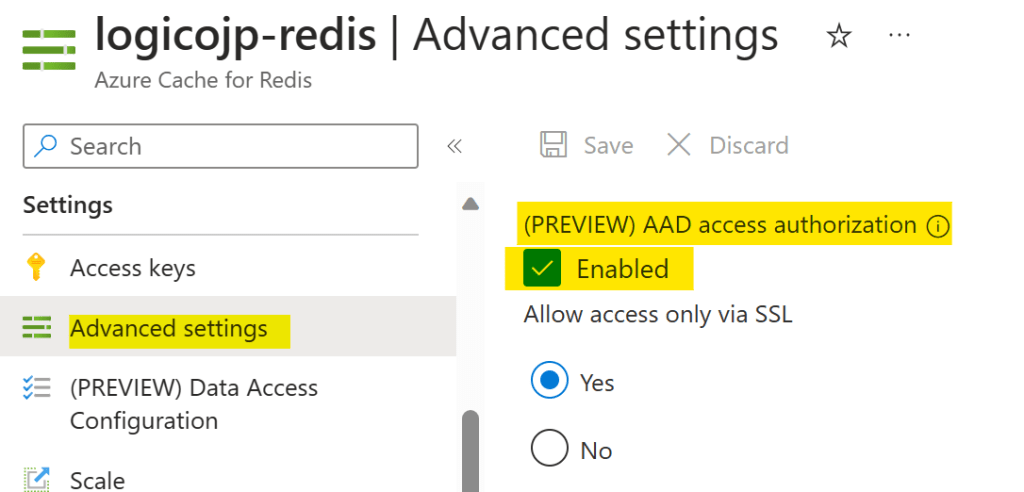
構成するにあたっては、Entra ID認証が有効化されている必要がある。デフォルトで有効になっているはずだが、念のため、Azure Portalで設定 > 詳細設定(Settings > Advanced Settings)とたどり、有効になっていることを確認する。チェックが入っていない場合には、チェックを入れて保存しておく。
RBACの構成
通常のManaged Identityを使ったRBACを構成する場合、Access Control (IAM) を使うが、Azure Cache for Redisの場合はちょっと違って【データアクセスの構成】 (Data Access Configuration) でRBACを構成する。

追加する際に、”New Redis User”とあるのでService PrincipalやManaged Identityではだめなのか、とも思えるが、もちろん大丈夫。Access Policyに各ユーザーを割り当てる点は、Managed Identityに対するRBACの構成と同じ。
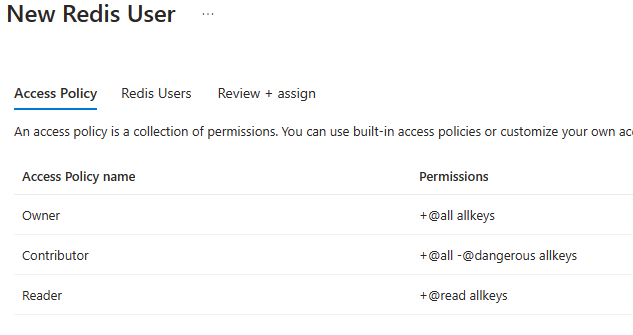
一般的には、書き込みアプリケーションはContributor、読み取りアプリケーションはReaderでよい。必要であれば、カスタムポリシーを作成できる。
データ アクセス ポリシーを使用してロールベースのアクセス制御を構成する / Configure role-based access control with Data Access Policy
https://learn.microsoft.com/azure/azure-cache-for-redis/cache-configure-role-based-access-control
認証のしくみ
以下のURLに記載の通り、MSAL(JavaだとMSAL4J)で認証を構成するのは同じだが、
- ポリシーに追加したユーザー名を使ってTokenを取得する必要がある
- 取得したTokenを定期的に更新する必要がある
の2点が、他のサービスの場合と異なり、少々癖がある。
Azure Active Directory を使用するように Redis クライアントを構成する / Configure your Redis client to use Azure Active Directory
https://learn.microsoft.com/azure/azure-cache-for-redis/cache-azure-active-directory-for-authentication#configure-your-redis-client-to-use-azure-active-directory
特に前者は、下図のようにユーザー名として表示される値を使う必要があるが、この値の実体はManaged IdentityやService PrincipalのObject IDである。なので、App Serviceなどであればアプリケーションの設定などを使い、環境変数として渡すなどの配慮が必要。

Entra ID認証を各種ライブラリで使う場合のガイド
Javaの場合、Lettuce、Jedis、Redissonなどのライブラリを使ってRedisを操作することが多いが、Entra ID認証を使う場合のガイドがGitHub上にある。この中にToken Cacheの実装例もある。
Azure Cache for Redis: Azure AD with Jedis client library
https://github.com/Azure/azure-sdk-for-java/blob/main/sdk/identity/azure-identity/src/samples/Azure-Cache-For-Redis/Jedis/Azure-AAD-Authentication-With-Jedis.md
Azure Cache for Redis: Azure AD with Lettuce client library
https://github.com/Azure/azure-sdk-for-java/blob/main/sdk/identity/azure-identity/src/samples/Azure-Cache-For-Redis/Lettuce/Azure-AAD-Authentication-With-Lettuce.md
Azure Cache for Redis: Azure AD with Redisson client library
https://github.com/Azure/azure-sdk-for-java/blob/main/sdk/identity/azure-identity/src/samples/Azure-Cache-For-Redis/Redisson/Azure-AAD-Authentication-With-Redisson.md
試してみる
Azure App Serviceで書き込み、読み取りのサービスを作成し、そのアプリのSystem assigned Managed IdentityをContributorのポリシーに割り当て、動作確認する。

アプリケーションとしては非常にシンプルで、Cacheへの読み書きをするだけ。今回はLettuceを使うMicronaut Redisで試す。
Micronaut Redis
https://micronaut-projects.github.io/micronaut-redis/latest/guide/
認証部分
MSAL4Jの箇所は基本的に同じで、DefaultAzureCredentialを使えばOK。今回はシンプルに逐一RedisClientを作成しているが、当然ながらパフォーマンスが出ないので、上記のドキュメントを参考にAccess Tokenを定期的に更新する仕組みを実装する必要がある。
DefaultAzureCredential defaultAzureCredential = new DefaultAzureCredentialBuilder().build();

RedisURI redisURI = RedisURI.Builder.redis(defaultRedisConfiguration.getHost())
        .withPort(defaultRedisConfiguration.getPort())
        .withSsl(defaultRedisConfiguration.isSsl())
        .withClientName(defaultRedisConfiguration.getClientName())
        .withAuthentication(RedisCredentialsProvider.from(() -> new AzureRedisCredentials(<Username>, defaultAzureCredential)))
        .build();

RedisClient redisClient = RedisClient.create(redisURI);
redisClient.setOptions(ClientOptions.builder()
        .socketOptions(SocketOptions.builder()
                .keepAlive(true)
                .build())
        .protocolVersion(ProtocolVersion.RESP2)
        .build());
return redisClient;
この中のAzureRedisCredentialsは、上記の「Azure Cache for Redis: Azure AD with Lettuce client library」の説明のまんまである。
あとは、Micronautのお作法でGET/POSTでCacheの読み書きをする実装をしている。POSTではJSONで渡ってきたデータを格納している。GETではnameというQuery Parameterを使ってKeyを検索し、結果を返している(応答が複数ある可能性があるので、Listで返すようにしている)。
// POST
try (RedisClient redisClient = this.getRedisClient()) {
    StatefulRedisConnection<String, String> connection = redisClient.connect(StringCodec.UTF8);
    RedisStringCommands<String, String> sync = connection.sync();
    System.out.println(sync.set(_greeting.getName(), _greeting.getMessage()));
    connection.close();
}
catch (Exception e) {
    e.printStackTrace();
    return HttpResponseFactory.INSTANCE
            .status(HttpStatus.INTERNAL_SERVER_ERROR)
            .body(String.format(errorMessage, e.getMessage()));
}
//GET
try (RedisClient redisClient = this.getRedisClient()) {
    StatefulRedisConnection<String, String> connection = redisClient.connect(StringCodec.UTF8);
    RedisStringCommands<String, String> sync = connection.sync();
    List<KeyValue<String, String>> keyValueArrayList = sync.mget(name.get());
    if(keyValueArrayList.isEmpty()) {
        return HttpResponseFactory.INSTANCE
                .status(HttpStatus.NOT_FOUND)
                .body(String.format(errorMessage,
                        String.format("No data related with specified key(%s) is not found.", name.get())));
    }
    ArrayList<Greeting> greetingArrayList = keyValueArrayList.stream()
            .map(keyValue -> new Greeting(keyValue.getKey(), keyValue.getValue()))
            .collect(Collectors.toCollection(ArrayList::new));
    connection.close();
    return greetingArrayList;
}
catch (Exception e) {
    e.printStackTrace();
    return HttpResponseFactory.INSTANCE
            .status(HttpStatus.INTERNAL_SERVER_ERROR)
            .body(String.format(errorMessage, e.getMessage()));
}
このエントリで使ったコードは以下にある。
Entra ID (a.k.a. Azure AD) authentication for Azure Cache for Redis
https://github.com/anishi1222/EntraID-Authentication-for-Azure-Cache-for-Redis
 Logico Inside