原文はこちら。
The original article was written by Christian Stein (Java Platform Group at Oracle).
https://inside.java/2023/11/06/in-memory-http-server-handler/
JEP 408のサマリー部分にインスパイアされました。
Summary Provide a command-line tool to start a minimal web server that serves static files in the current directory. This low-threshold utility will be useful for prototyping, ad-hoc coding, and testing purposes, particularly in educational contexts.
JEP 408: Simple Web Server
(カレントディレクトリの静的ファイルを提供する最小限のウェブサーバーを起動するコマンドラインツールを提供します。この閾値の低いユーティリティは、プロトタイピング、アドホックなコーディング、テスト目的、特に教育的な文脈で有用です。)
https://openjdk.org/jeps/408
以下は、インメモリ・アセットを扱うhttpハンドラの実装です。これは、よく知られた一連のアセットに対してGETやHEADリクエストを発行したい http クライアントテストを実行するのに便利です。
Asset
アセットレコードはhttpリターンコード、送信バイト数、Content-Typeレスポンスヘッダとして使われるtypeコンポーネントをカプセル化します。
public record Asset(int code, byte[] data, String type) {

  public static Asset of(byte... bytes) {
    return new Asset(200, bytes, "application/octet-stream");
  }

  public static Asset ofBase64(String base64, String type) {
    return new Asset(200, Base64.getDecoder().decode(base64), type);
  }

  public static Asset ofHtml(String html) {
    return Asset.ofText(200, html, "text/html");
  }

  public static Asset ofText(String text) {
    return Asset.ofText(200, text, "text/plain");
  }

  public static Asset ofText(int code, String text, String type) {
    return new Asset(code, text.getBytes(StandardCharsets.UTF_8), type);
  }

  // ... here be more convenient factory methods
}
よく知られているアセットをすべてMap<String, Asset>にまとめ、絶対リクエストパスをキーとして使用します。
Map<String, Asset> createAssets() {

    return Map.of(
        "/index.text", Asset.ofText("Index"),

        "/index.html", Asset.ofHtml(
        """
        <html>
          <body>
            <h1>Index</h1>
          </body>
        </html>
        """)

        // ... here be more path-asset mappings
    );
}
デフォルトでは、ディレクトリ(/で終わるもの)を表すすべてのパスはディレクトリリストを生成するアセットにマッピングされます。その他のすべてのマップされていないパス(ディレクトリではないもの)は404エラーページを描画するアセットにマッピングされます。
Command-line Demo
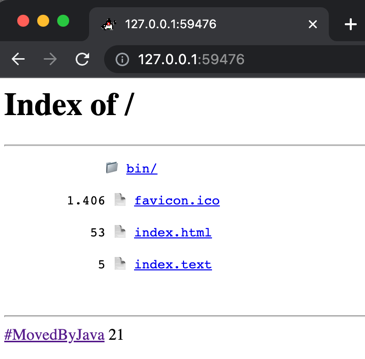
コマンドラインからインメモリhttpサーバーのデモを起動します。
$ java InMemoryHttpServer.java
> InMemoryHttpServer
> http://127.0.0.1:59476
Open the URL in a browser:
Links
- InMemoryHttpServer.java
https://sormuras.github.io/demo/main/InMemoryHttpServer.java - Module
jdk.httpserver
https://docs.oracle.com/en/java/javase/21/docs/api/jdk.httpserver/module-summary.html - JEP 408: Simple Web Server
https://openjdk.org/jeps/408
 Logico Inside