このエントリは2023/12/25現在の情報に基づいています。将来の機能追加や変更に伴い、記載内容からの乖離が発生する可能性があります。
問い合わせ
いつもの人とは違う人から、以下のような問い合わせが届いた。
いまGitHub ActionsでCIのフローを作成中である。リポジトリからコードをフェッチするのに
checkoutを使っているが、特定ディレクトリのコンテンツのみフェッチする仕組みはないか?
問い合わせをもらったときに、「そもそもリポジトリをわけましょうや」という感じしかしないが、どうしてもやりたい、ということらしい。
なお、checkoutの最新はV4(4.1.1)。
Checkout V4
https://github.com/actions/checkout
解決策
3.5.3で導入されたsparse-checkoutを使い、フェッチしたいディレクトリを指定する。以下のIssueで取り上げられているので、ご覧になったことがあるかもしれない。
Checkout Specific Folder/Directory/Path within GitHub Repository #483
https://github.com/actions/checkout/issues/483
日本語でも、以下のブログエントリに記述がある。
リポジトリの一部分だけcheckoutできるsparse-checkoutがactions/checkout@v4に来てた
https://qiita.com/nicco_mirai/items/5a306549e57ee69403c9
sparse-checkoutについてはこちら。
sparse-checkout: a subcommand in git used to reduce the files present in the working tree to a subset of all tracked files. Also, the name of the file in the $GIT_DIR/info directory used to track the sparsity patterns corresponding to the user’s desired subset.
Git – sparse-checkout Documentation
(gitのサブコマンドで、作業ツリーに存在するファイルを、すべての追跡対象ファイルのサブセットに削減するために使用します。また、$GIT_DIR/infoディレクトリのファイル名を使い、ユーザーが希望するサブセットに対応するスパースパターンを追跡します。)
https://git-scm.com/docs/sparse-checkout
また、cone modeについて把握しておくと理解が速い。
cone mode: one of two modes for specifying the desired subset of files in a sparse-checkout. In cone-mode, the user specifies directories (getting both everything under that directory as well as everything in leading directories), while in non-cone mode, the user specifies gitignore-style patterns. Controlled by the –[no-]cone option to sparse-checkout init|set.
Git – sparse-checkout Documentation
(sparse-checkoutで希望するファイルのサブセットを指定する2つのモードのうちの1つ。coneモードでは、ユーザはディレクトリを指定します(そのディレクトリの下にあるすべてのものと、先行するディレクトリにあるすべてのものの両方を取得します)。一方、non-coneモードでは、ユーザはgitignoreスタイルのパターンを指定します。sparse-checkout init|setの–[no-]coneオプションで制御します。)
https://git-scm.com/docs/sparse-checkout
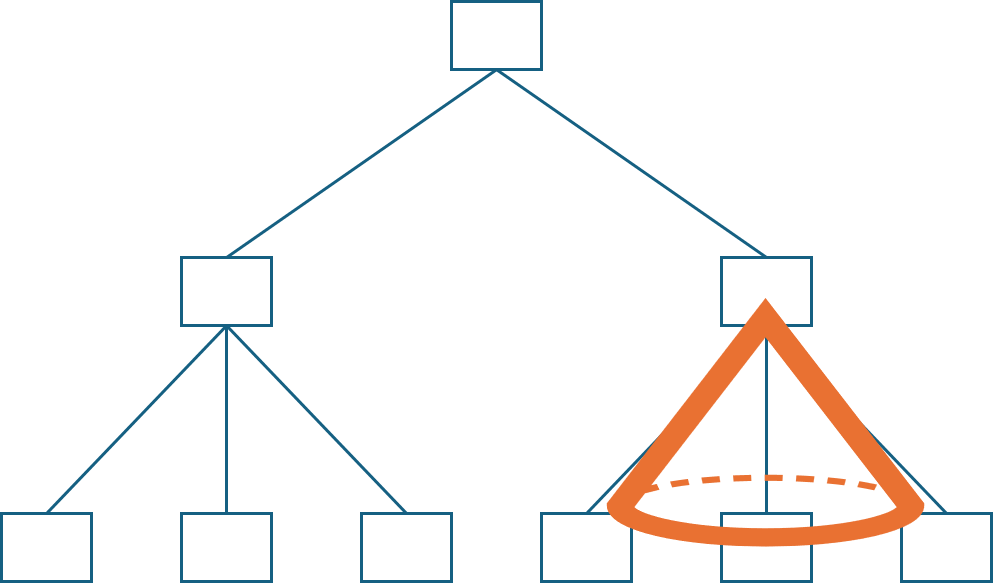
Cone modeは下図の円錐(Cone)の通り、Rootのディレクトリから以下すべてを対象にする、という考え方。
具体的には
特定ディレクトリ(サブディレクトリを含む)だけをフェッチしたい場合、Coneモードは有効にしたまま、sparse-checkoutでディレクトリを指定する。以下の例では.githubとsrcというディレクトリだけをフェッチするよう指示している。
- uses: actions/checkout@v4
  with:
    sparse-checkout: |
      .github
      src
特定のファイルや特定ディレクトリ(サブディレクトリを含まない)だけをフェッチしたい場合、Coneモードは無効化しないといけないので、sparse-checkout-cone-mode: falseを指定した上で、sparse-checkoutで対象のファイルを指定する必要がある。
- uses: actions/checkout@v4
  with:
    sparse-checkout: |
      README.md
    sparse-checkout-cone-mode: false
 Logico Inside