このエントリは2025/01/24現在の情報に基づいています。将来の機能追加や変更に伴い、記載事項からの乖離が発生する可能性があります。
これは何について書いたものか
以前より、”Create from Azure Resource” からAOAIインスタンスを選択して構成することはできたのだが、AOAIに対するRBACが非常に簡単になっており、Inbound sectionで何も記述する必要がなくなっていた。

何がどう変わったのか
以前、以下のようなエントリを書いた。
この中で、バックエンドサービスとしてAOAIを使う場合、managed identityを使ってJWTを取得し、Bearer tokenとしてHeaderに付与するために以下のようなポリシー式を作成する必要がある、と書いていた。
<authentication-managed-identity resource="https://cognitiveservices.azure.com" />
しかし現在少々構成が変わっていてBackendsに認証の仕組みがあって、この中でmanaged identityとresource IDを指定できるようになっている。
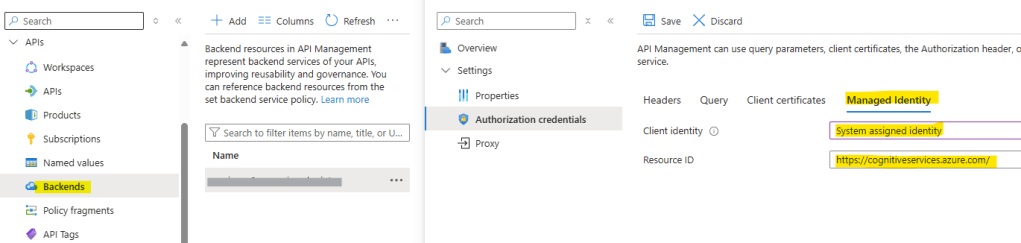
これを使えば、Inbound sectionにポリシーを構成しなくてもよくなっている(厳密には、Backends内で設定が埋め込まれている)。
API Keyを使う場合は、Headersにapi-keyを指定し、API Keyを手入力するか、Named valueに保存されているものを利用できる。

この内容は、ドキュメントにはさらっとしか記述がないため見過ごしてしまうかもしれない。
API Management supports backend entities so you can manage the backend services of your API. A backend entity encapsulates information about the backend service, promoting reusability across APIs and improved governance.
Use backends for one or more of the following:
- Authorize the credentials of requests to the backend service
- Take advantage of API Management functionality to maintain secrets in Azure Key Vault if named values are configured for header or query parameter authentication.
- Define circuit breaker rules to protect your backend from too many requests
- Route or load-balance requests to multiple backends
Configure and manage backend entities in the Azure portal, or using Azure APIs or tools.
バックエンドの利点 / Benefits of backends – https://learn.microsoft.com/azure/api-management/backends?tabs=bicep#benefits-of-backends
Bicep/ARMではどのように記述されているか?
Backendsは以下のREST APIで確認できる(Azure CLIやPowerShellにコマンドは用意されていない)。Backendsについては以下のエントリでさらっと書いているが、細かい表現はしていない。
Backend – Get
https://learn.microsoft.com/azure/api-management/backends?tabs=bicep#benefits-of-backends
これを使うと、以下のように構成であることがわかる。
{
    "id": "/subscriptions/{subscription}/resourceGroups/{resource_group}/providers/Microsoft.ApiManagement/service/{service_name}/backends/aoai-endpoint",
    "name": "aoai-endpoint",
    "properties": {
    "credentials": {
        "header": {},
        "managedIdentity": {
        "clientId": null,
        "resource": "https://cognitiveservices.azure.com/"
        },
        "query": {}
    },
    "protocol": "http",
    "title": null,
    "url": "https://<AOAI instance name>.openai.azure.com/openai"
    },
    "type": "Microsoft.ApiManagement/service/backends"
}
各要素についてはAPIリファレンスにさらっと書いてあるが、これではわかりづらいとは思う。
Backend – Create Or Update
https://learn.microsoft.com/azure/api-management/backends?tabs=bicep#benefits-of-backends
なお、API Keyを使う場合だと、以下のような構成であった(Named valueを使っていないので、API Keyが露出している)。
{
    "id": "/subscriptions/{subscription}/resourceGroups/{resource_group}/providers/Microsoft.ApiManagement/service/{service_name}/backends/aoai-endpoint",
  "name": "aoai-wus3-openai-endpoint",
  "properties": {
    "credentials": {
      "header": {
        "api-key": [
          "<API key for Azure OpenAI Service>"
        ]
      },
      "query": {}
    },
    "protocol": "http",
    "title": null,
    "url": "https://<AOAI instance name>.openai.azure.com/openai"
  },
  "type": "Microsoft.ApiManagement/service/backends"
}
 Logico Inside