このエントリは2025/05/21現在の情報に基づいています。将来の機能追加や変更に伴い、記載事項からの乖離が発生する可能性があります。
問い合わせ
Azure OpenAI Service (AOAI) にご執心のいつもの主から問い合わせがあった。
Build 2025が始まったってことは、AOAIやAPI Management (APIM) に関するアップデートもあると思うんだが、何かないの?できればStream有効時にログを取得できるようになっていたらええねんけど。
この主は以下のエントリの人。ある種定期連絡的なお問い合わせである。
以下のようなAOAI、APIMの配置で、APIMでprompt、chat completion、token usageログを取りたい、というもの。

なんと!
Build 2025にあわせて機能追加が発表された。
Introducing Model Logging, Import from AI Foundry, and extended model support in AI Gateway
https://techcommunity.microsoft.com/blog/integrationsonazureblog/introducing-model-logging-import-from-ai-foundry-and-extended-model-support-in-a/4415210
どうやらStream有効時にも効果があるよう。
構成してみる
設定は2段階で実施する。
- 診断設定で、該当ログを出力するように構成
- APIに対してログ出力を構成
[1] 診断設定
診断設定の構成自体は他のサービスと大きな違いはない。「生成AI Gateway関連のログ」出力を選択できるようになっているので、これを有効にしておく(過去にAPIMに対して診断設定を構成していた場合、AI Gateway関連のログ出力は有効にはなっていない)。もちろん、allLogsを選択しておいてもよい。

このUIを見ると、Websocket Connectionsに関するログも出力できるようになっている。このおかげで、Stream有効時のログ出力も可能になったよう。
[2] APIに対する設定
手順は以下のドキュメントに記載がある通りだが、メモとして残しておく。
API ログ設定を変更する / Modify API logging settings
https://learn.microsoft.com/azure/api-management/monitor-api-management#modify-api-logging-settings
APIs > APIs から、All APIsもしくは個別のAPIに対して、Settings > Azure Monitor > Diagnostics Logsとたどり、Log LLM messagesをEnabledにすると、上のスクリーンショットのように、何をログとして記録するか指定できる(下図)。

設定そのものは難しくない。ログに書き出す最大サイズを指定してSaveをクリックすれば設定は終了。
ログの出力先はApiManagementGatewayLlmLogである。
ApiManagementGatewayLlmLog
https://learn.microsoft.com/azure/azure-monitor/reference/tables/ApiManagementGatewayLlmLog
試してみる
まずはStreamを無効にしている場合を試す。プロンプトは以下の通り。
{
  "messages": [
    {
      "role": "system",
      "content": [
        {
          "type": "text",
          "text": "You are an AI assistant that helps people find information."
        }
      ]
    },
    {
      "role": "user",
      "content": [
        {
          "type": "text",
          "text": "竹取物語について教えてください。"
        }
      ]
    }
  ],
  "temperature": 0,
  "top_p": 1,
  "max_tokens": 32768
}
ApiManagementGatewayLlmLogを確認したところ、以下のような結果を得た。

SequenceNumberというのが出ているが、以下のような扱い。
- 0: トークンなどの情報を格納(ある種Header的な扱い)
- 1: Promptの情報を格納 (32kBを超える場合はチャンクされたものが後続するため、SequenceNumberは1だけでなく、2以後に及ぶ場合がある)
- 2: Response (Completion) 情報を格納 (Promptが32kBを超えている場合、Promptに使ったSequenceNumberの次から開始)
そのため、Token usageを確認するなら、SequenceNumberがゼロのものを確認すればよい。
なお、このAPI呼び出しのResponseに入っているToken Usageは以下だったので、値にずれはない(あっては困るんだが)。
{
    "usage": {
        "completion_tokens": 578,
        "completion_tokens_details": {
            "accepted_prediction_tokens": 0,
            "audio_tokens": 0,
            "reasoning_tokens": 0,
            "rejected_prediction_tokens": 0
        },
        "prompt_tokens": 31,
        "prompt_tokens_details": {
            "audio_tokens": 0,
            "cached_tokens": 0
        },
        "total_tokens": 609
    }
}
ではStreamを有効にした場合も試す。Promptはこちら。
{
  "messages": [
    {
      "role": "system",
      "content": [
        {
          "type": "text",
          "text": "You are an AI assistant that helps people find information."
        }
      ]
    },
    {
      "role": "user",
      "content": [
        {
          "type": "text",
          "text": "竹取物語について教えてください。"
        }
      ]
    }
  ],
  "temperature": 0,
  "top_p": 1,
  "stream":true,
  "stream_options" :{
    "include_usage" : true
  },
  "max_tokens": 32768
}
ApiManagementGatewayLlmLogは以下のよう。

どうやらちゃんと取得できているように見える。IsStreamCompletionがtrueであるので、Stream有効時にも取得できている。こちらの場合のAPI Responseは以下の通りだったので、値にずれはない。
{
    "choices": [],
    "created": 1747825948,
    "id": "chatcmpl-BZbf25GDfefn8Rx9bxvGIUJW6XaAs",
    "model": "gpt-4.1-2025-04-14",
    "object": "chat.completion.chunk",
    "system_fingerprint": "fp_3dfb47c1f3",
    "usage": {
        "completion_tokens": 626,
        "completion_tokens_details": {
            "accepted_prediction_tokens": 0,
            "audio_tokens": 0,
            "reasoning_tokens": 0,
            "rejected_prediction_tokens": 0
        },
        "prompt_tokens": 31,
        "prompt_tokens_details": {
            "audio_tokens": 0,
            "cached_tokens": 0
        },
        "total_tokens": 657
    }
}
この機能のうれしいところ
これまでログを取得しようとすると、Event HubsやApplication Insightsを使った方式しかなかったのだが、いずれもバッファリングをしてしまう関係上、Stream有効化時には利用できなかった(厳密に言うと、利用は推奨されていない)。しかもApplication Insightsに格納する場合は、Inbound、OutboundのRequest/Responseがともに最大8,192バイトという、LLMのログ用途には少なすぎるキャパシティだったこともあり、使いづらいものであった。
今回追加された機能はStreamの有無を問わずに利用できる点もよい。なお、ドキュメント内の「重要」と記載されている点は注意が必要。
Generative AI gateway logs – LLM request or response messages up to 32 KB in size, if collected, are sent in a single entry. Messages larger than 32 KB are split and logged in 32 KB chunks with sequence numbers for later reconstruction. Request messages and response messages can’t exceed 2 MB each.
(収集された場合、最大 32 KB のサイズの LLM 要求または応答メッセージが 1 つのエントリで送信されます。 32 KB を超えるメッセージは分割され、後で再構築するためにシーケンス番号を含む 32 KB のチャンクに記録されます。 要求メッセージと応答メッセージは、それぞれ 2 MB を超えることはできません。)
API ログ設定を変更する / Modify API logging settings
https://learn.microsoft.com/azure/api-management/monitor-api-management#modify-api-logging-settings
API Subscription IDごとのToken Usageを取得する
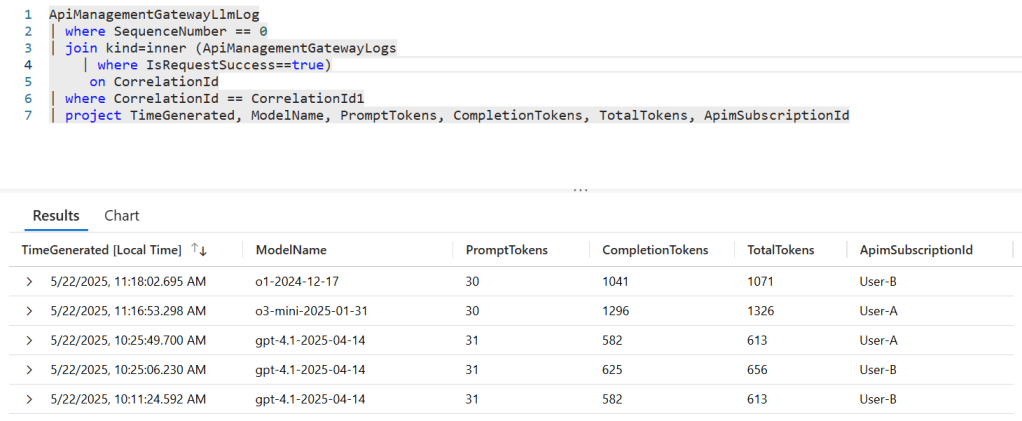
個々人やグループごとにAPIMで発行したSubscription Keyを使って、各ユーザーのToken usageを月次で集計したい、なんてのはよくあるユースケースだが、今回の機能追加のおかげで、ApiManagementGatewayLlmLogとApiManagementGatewayLogsを使えば計算できるようになっている。結合に使う条件はCorrelationIdを使う。
例えば、以下のような感じでKQLを作成する。なお、ここで例示しているクエリは動作確認を意図している(実際にはもっと性能が出るクエリがあるはず)。
ApiManagementGatewayLlmLog
| where SequenceNumber == 0
| join kind=inner (ApiManagementGatewayLogs
    | where IsRequestSuccess==true )
     on CorrelationId
| where CorrelationId == CorrelationId1
| project TimeGenerated, ModelName, PromptTokens, CompletionTokens, TotalTokens, ApimSubscriptionId
これを呼び出すと以下のような結果が得られる。
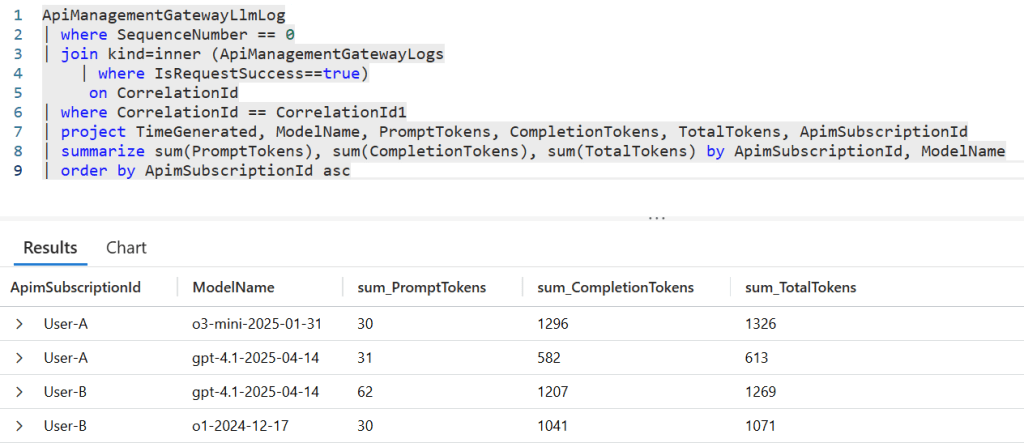
この結果を踏まえて、Subscription Keyとモデルを軸にToken usageを集計するKQLは以下のような感じ。
ApiManagementGatewayLlmLog
| where SequenceNumber == 0
| join kind=inner (ApiManagementGatewayLogs
    | where IsRequestSuccess==true)
     on CorrelationId
| where CorrelationId == CorrelationId1
| project TimeGenerated, ModelName, PromptTokens, CompletionTokens, TotalTokens, ApimSubscriptionId
| summarize sum(PromptTokens), sum(CompletionTokens), sum(TotalTokens) by ApimSubscriptionId, ModelName
| order by ApimSubscriptionId asc
実行すると、Subscription ID、モデルで集計した値が確認できる。
 Logico Inside